Adobe Photoshop 28.0 can add a light to a scene after the shoot. Adobe Lightroom 10.0 can use a second frame to fix a blink. Both desktop updates are available immediately following the November 10 announcement at Adobe MAX. Only Photoshop is on Adobe’s initial list for local Model Context Protocol (MCP) support. For photographers who start a job in Lightroom and finish individual images in Photoshop, that omission leaves the first half of the workflow outside Adobe’s announced integration.
9to5Mac’s account of Adobe MAX covers the broader rollout. The photo updates are easier to make sense of when you follow a single job from the shoot to the finished file.
Photoshop puts controls on generated edits
In Photoshop 28.0 , Relight adds up to three adjustable light sources. You can move a light around on the canvas and change its color, intensity and diffusion without overwriting the original. Imagine a portrait where the subject’s jacket disappears against a dark wall. A small rim of light could restore the outline. The ability to move the light also lets you judge whether it makes sense alongside the shadows already in the frame. Our earlier guide to Photoshop’s Light adjustment layer shows how to use two masks to adjust the face and wall separately.
Generative Restyle gives a written edit an adjustable intensity. Start with Prompt to Edit, turn the result into a Generative Restyle layer and dial the effect up or down with its custom slider. If a prompt pushes a color treatment too far, the slider gives you a way to soften the result without writing the prompt again. The updated Remove Tool can take out related details such as an object’s shadow or reflection. Quick Compare offers a split view against the original so you can check what else changed. PetaPixel’s coverage of the Photoshop update shows Adobe’s before-and-after examples for Relight, Generative Restyle and Quick Compare.
The localized image-editing article gives a simple way to compare these editing controls with other tools: inspect what stayed intact around the change you asked for.
The AI Assisted Editor puts natural-language editing and generative tools up front, with a switch back to the Pro Editor and its layers. Adobe also showed Camera Angles, Mockups and Generative Recompose in the separate Photoshop beta app. Adobe’s Creative Cloud release overview distinguishes those previews from the shipping desktop tools.
Lightroom 10.0 is available now
Blemish Removal and camera tethering are available immediately. The AI-powered Blemish Removal tool detects spots such as blemishes, moles and freckles. Use Fade to reduce the strength or refine the selection to remove or restore individual spots. It gives you a way to keep a feature someone wants to keep, even when the automatic pass selects it.
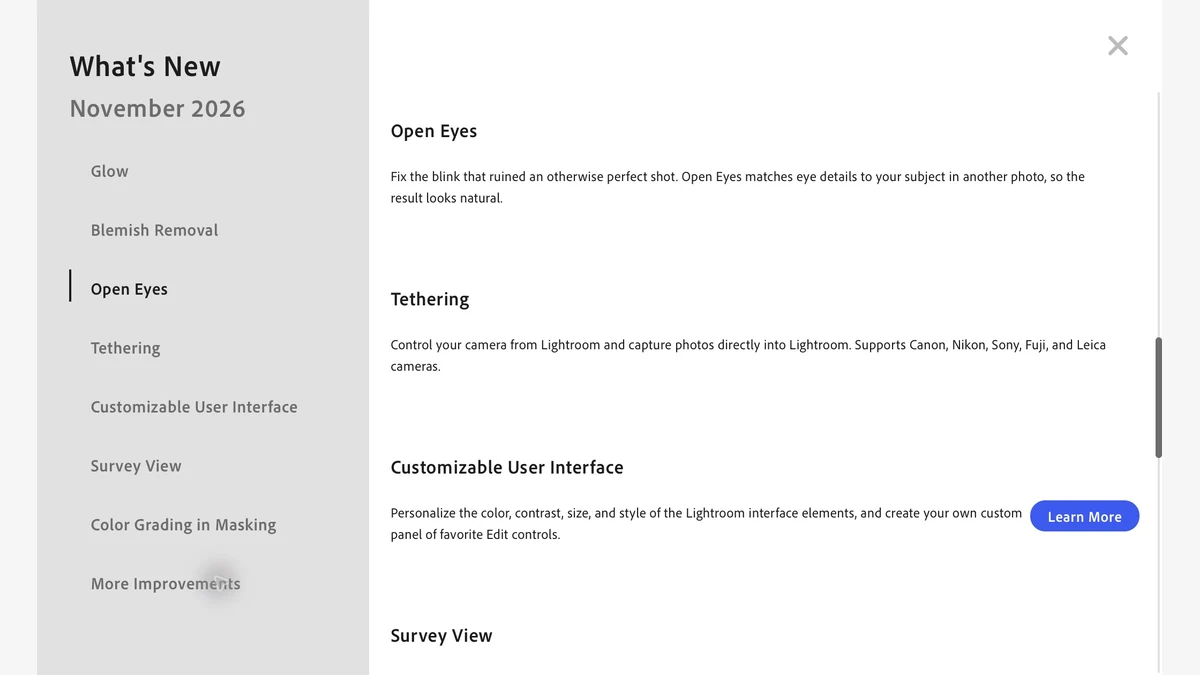
Tethered Capture brings incoming shots directly into Lightroom on desktop and Lightroom 12.0 on iPad . Connect a supported camera to preview the shot, adjust camera settings and review images as they arrive. Desktop also supports overlays, multiple cameras, automatic application of presets and keywords, and tethering in Local mode. On iPad, a USB data cable connects a compatible camera directly.
Open Eyes is available in early access on desktop. It uses another photo of the same person to repair a blink. You can choose the reference or let Lightroom look in the library. For a group portrait, the next frame may have the eyes you need even if the original has the best expression everywhere else.
Adobe details the rest in its desktop feature guide and Lightroom 10.0 release notes .
- Light and color. Glow has six styles, including Bloom, Halation and Diffusion, and can be limited to a mask. Color Grading works inside masks, and the Vectorscope charts hue and saturation. The Temperature slider reaches further into very warm light.
- Depth and geometry. Depth Range uses AI to build a depth map for photos that lack one. Edit the foreground, middle ground or background separately. Projection reduces the stretching of faces near the edges of wide-angle photos.
- Picking and keeping edits. Survey view compares multiple photos together. Updated Assisted Culling models help evaluate frames. Local mode now supports named edit versions.
- Workspace and support. Pick a preset workspace or customize its layout, appearance and shortcuts, including supported Classic shortcuts. Reorder favorite editing controls, import or export Favorites settings, and Shift-click to keep compatible panels open side by side. Adobe also added camera and lens support and fixed stability issues.
DPReview highlights the customizable interface across the desktop release. Our guide to Lightroom masking shows how separate masks for the sky and foreground can change the balance of a whole frame.
Lightroom Classic, mobile and web
Lightroom Classic 16.0 gets Blemish Removal with per-face refinement in group shots, Glow and its presets, AI-generated depth maps, Color Grading within masks, a Vectorscope, Projection, customizable Masking controls and a wider Temperature range. Import filters can use in-camera ratings, color labels, protection status and file type. A focus-point overlay shows where supported cameras focused. You can clear edit-history steps manually or on a schedule while preserving a photo’s current appearance. Adobe also expanded tethered camera and camera/lens profile support. The Classic release notes and Classic feature guide give the version details.
Lightroom mobile 12.0 adds Glow with ten presets and improves Blemish Removal. The iPhone release and Android release list the prompt-based AI Assistant in early access. Android adds a Home tab. Alongside tethered capture, iPad gets automatic masking for people and their features. The mobile release notes also list new camera and lens profiles and stability fixes.
Lightroom on the web adds Glow, Generative Expand, improved Blemish Removal, Color Grading inside masks, Depth Range masking, a wider Temperature range, Projection and a Vectorscope. From the grid, you can apply global edits to up to 1,000 photos, compare two different photos or take quick actions such as rating and flagging. The web update also adds rule-based Smart Albums, expanded search filters, album covers pinned in the sidebar and a redesigned Community viewer. Find Duplicates is in early access and can group exact matches, similar images or raw and rendered pairs. Adobe lists the full changes and camera and lens updates in its Lightroom web release notes .
The MCP gap starts at the shoot
Model Context Protocol is a standard that lets AI assistants call tools made available by other software. In Adobe’s announced implementation , a third-party agent will be able to work locally in native Photoshop, Illustrator, Premiere and After Effects projects. The result can stay editable as layers, vectors or sequences. Adobe is targeting early 2027 for a private beta.
Leaving Lightroom out is disappointing because so much repetitive photo work happens before a file ever reaches Photoshop. On a portrait job, it would be useful to ask an agent to gather the flagged frames, apply a starting grade to a lighting setup and leave the results for review. The Photoshop integration would help once a chosen file is open. Adobe has announced no date for bringing that Lightroom or Lightroom Classic work into the same handoff.
In Premiere, new AI audio tools can separate overlapping voices or isolate sound sources, while its Generative Media Tool puts video and audio generation on the timeline. For video editors following the rest of MAX, CNET covers the separate Firefly video editor and its storyboarding tools. Variety reports on Project Live Set , an early research demo that lets editors see generative changes while a clip plays. For photographers, the most useful expansion would be an agent that could follow the work from the collection of raw files to the layered file, with a chance to review the result at both ends.
Adobe product screenshot(s) reprinted with permission from Adobe. Adobe, After Effects, Illustrator, Lightroom, Photoshop and Premiere are either registered trademarks or trademarks of Adobe in the United States and/or other countries.
FAQ
Did Adobe announce that Lightroom would join the MCP beta?
The stated private beta plan covered Photoshop, Illustrator, Premiere and After Effects. The article reports no date for Lightroom.