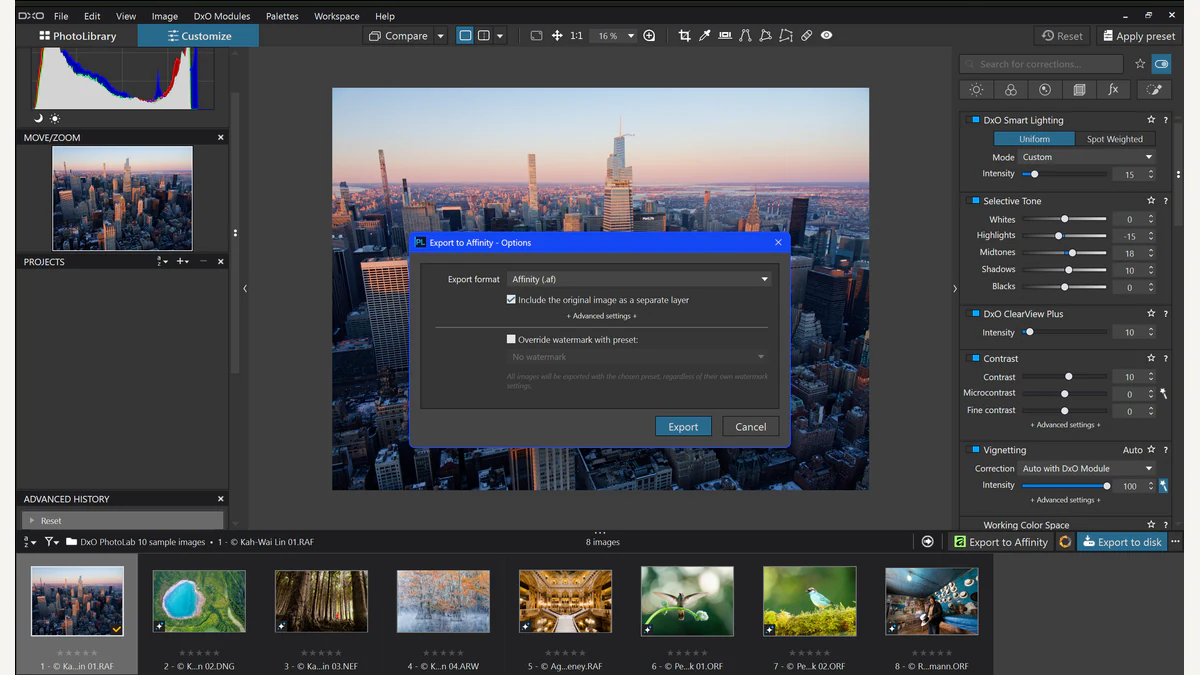
A RAW developer and a layered image editor can serve different stages of the same photograph. DxO PhotoLab 10.1 now gives that transition a native Affinity file. The important detail is what crosses the boundary: developed pixels, with an optional original-image layer, rather than an interchangeable RAW adjustment history.
DxO’s announcement describes direct export into an Affinity .af document and a free update for PhotoLab 10 owners. DIYPhotography’s October 5 account brings the integration into current coverage. DxO’s press lounge dates the release announcement to September 29, so this is not a claim that the software first launched today.
The handoff preserves a result
PhotoLab develops the image before export. DxO identifies optical corrections, denoising, local adjustments, and colour work as part of that stage. The .af document then opens in Affinity for further editing. The optional second layer contains the uncorrected original image.
That gives the photographer two kinds of control at different moments. Development decisions shape the image that leaves PhotoLab. Layer editing then works with that rendered result. The native document provides an Affinity starting point, but it does not make a PhotoLab adjustment slider available as an equivalent Affinity control.
The difference is easiest to see with a simple example. Suppose the photographer changes colour and tone in PhotoLab, then exports the result. An Affinity layer contains the appearance produced by those choices. Hiding that layer can reveal another layer beneath it. It does not rewind the separate development decisions that created the upper layer.
This is why layers in digital image editing are useful context. A layer gives an editor a separate surface to transform, mask, or combine. It does not automatically preserve the internal history of every application that produced its pixels.
The optional original answers a different question
Including the original gives the document a comparison surface. The photographer can move between the developed and uncorrected versions, or use a mask to reveal part of the lower layer. That is a useful visual relationship, distinct from continuing RAW development in another engine.
A mask can decide where a layer contributes. It does not choose a new interpretation of the sensor data inside PhotoLab. Keeping those roles separate makes the file easier to understand, especially when the image later contains additional retouching or compositing work.
The official PhotoLab export guide states that PhotoLab and Affinity use different processing engines. It distinguishes opening an original RAW file in Affinity’s development mode from sending a processed image into pixel editing. The native .af route belongs to that second relationship.
For a photographer, the question is therefore what should be settled before the handoff. Optical corrections and the preferred developed rendering belong to the PhotoLab stage. The later document can organize further pixel work around that result. The boundary remains visible even though the export itself becomes more direct.
The guide identifies limits that matter in practice
The current guide excludes .af export on Intel-based Macs. It also says that .af files are not yet displayed in PhotoLab’s image browser. Those are concrete compatibility and file-navigation limits, rather than a judgment about how well the applications work together in every other respect.
The guide also warns that exporting again to an existing .af destination can discard layers added after the earlier handoff. A native format does not, by itself, guarantee an automatic round trip that merges later edits. The route creates a document from PhotoLab’s current result.
This makes preserving a finished layered document a separate responsibility. Treat the developed source and the later editing document as related working files with different histories. If the source rendering changes, consider what that means for work already performed on the exported version before replacing it.
The same guide documents current colour-profile and metadata limitations. These deserve attention in a workflow where colour consistency or embedded information matters. The presence of an .af extension alone is not evidence that every delivery property has survived unchanged.
A native file reduces friction without erasing the stages
A direct export can remove an intermediate opening step. The photographer develops the image in one application, chooses the handoff, and continues in the other. That is a meaningful convenience even when the underlying stages remain distinct.
It can also make the optional comparison layer easier to use. The original and processed appearance arrive in one document, rather than requiring a separate assembly step. The resulting file has a clearer starting arrangement for visual comparison or masking.
The integration should therefore be evaluated through the work it connects. Someone who already prefers PhotoLab for RAW development and Affinity for pixel editing has a specific route to examine. Someone who needs editable RAW settings shared between applications has a different requirement that this handoff does not establish.
The Newsroom’s earlier PhotoLab 10 depth-mask coverage addresses tools within the development stage. The 10.1 export addresses what happens after that stage produces an image. Those are related changes with different photographic consequences.
The official press lounge supplies the current release and approved screenshot resources. The strongest reading of the new feature is precise: PhotoLab can hand a developed image to Affinity in a native layered document. Its usefulness rests on that defined transition, with the guide’s compatibility, preservation, and colour limits kept in view.