AI assisted development
My Vibe Coding Journey: Building with Generative AI
A personal record of returning to software development through generative AI, from useful apps and websites to interactive games, original news, and connected tools.
From using AI to building with it
Quick Summary
For me, vibe coding is not about skipping the work of software development. It is about changing the speed, shape, and rhythm of how the work gets done.
Like many people, my journey with Generative AI started with ChatGPT. At first, I used it to explore ideas, ask questions, write, translate, research, and think out loud. Over time, that journey expanded to tools like Gemini, NotebookLM, and most recently Codex. Generative AI became more than something I used. It became something I could build with.
This page brings together several projects from that journey, from simple utility apps and website modernization to learning microsites, interactive experiments, an original Newsroom, and tools I use every day. Each project is teaching me how to work with AI as a development partner while still relying on human judgment, product thinking, design taste, testing, and iteration.
The shift changed everything
From Exploring AI to Building with It
At first, Generative AI felt like a new way to think, write, research, and organize ideas. Then it became a way to make things. That shift changed everything for me. I was no longer only using AI to support my creative and professional work. I was using it to turn ideas into working tools, websites, learning experiences, and experiments I could actually test, refine, and share.
After years away from day to day coding, Codex gave me a way back into software development. My background at AT&T Bell Labs and in global engineering leadership still mattered, but AI helped reactivate that experience in a more hands-on way.
For me, vibe coding has not been about skipping the work. It has been about changing the speed, shape, and rhythm of how the work gets done while keeping judgment at the center.
Tools, websites, learning systems, and experiments
Vibe Coding Projects in Practice
These projects reflect the way I am learning vibe coding in practice. I started with small, useful tools, then moved into website modernization, learning microsites, interactive experiences, publishing, and integrations.
Each project is teaching me something different about working with AI as a development partner, from giving better instructions and reviewing code to thinking through product behavior, testing, deployment, documentation, and iteration.
First practical build
Currency Exchange: FX2USD SPA
My first vibe coding project was intentionally small and practical: a single-page app for currency exchange that I could use while traveling. I wanted something simple enough to finish, but useful enough to rely on in real situations.
The project grew through iteration. I added features such as bank note references and exchange log history, while also removing clutter and improving the user experience. It helped me get comfortable with the rhythm of working with Codex: ask for a first version, test it, notice what was missing, refine the behavior, simplify what got in the way, and keep going.


Website modernization
Website Modernization: Optima Optometry
More than 15 years ago, I built a static website for Optima Optometry. The site needed to be refreshed, so I used Codex to help modernize it. This became one of the first projects where I saw how effective AI assisted development could be on a real website with an existing business purpose.
The process still required a lot of direction: guiding the design, reviewing output, refining copy, and making sure the site still served the business clearly. The speed and quality surprised me. It reminded me that AI is most useful when paired with clear intent.


Portfolio and nonprofit sites
Personal Website Upgrades: Portfolios and Nonprofits
After Optima Optometry, I used vibe coding to modernize several of my own websites, including this personal site, Spark Academy, and Happy Planet Children. Each site had a different purpose, audience, and tone.
What might once have taken days or weeks of scattered work could now be done in a few focused sessions. AI helped accelerate the implementation, but the important decisions still came from strategy, audience, message, structure, and taste.
Tocatlian


Spark Academy


Happy Planet Children


Learning experience design
Learning Microsite: 30 Day AI at Work Challenge
As more friends began asking how I was using AI, I decided to turn my experience into a practical learning program built around 30 minutes a day for 30 days.
I wrote most of the lesson plans myself, then used Codex to help expand the material, fill in missing pieces, organize parts of the experience, and build a micro-learning site around the course. I also used the OpenAI APIs to create audio podcasts for each lesson. This showed me how vibe coding could support education design and structured learning just as effectively as software development.


Interactive experiment
AI Assisted Game Development: Monaco Racing
Monaco Racing was new territory for me. I am not a big game player, and I had never built a game before, but I wanted to see what would happen if I pushed vibe coding into something more interactive and dynamic.
A game introduces a different kind of challenge: movement, timing, difficulty, feedback, controls, scoring, and feel. Building it helped me understand both the power and limits of AI assisted development. Codex generated a lot quickly, but the project required constant judgment to shape the gameplay and make sure it felt alive.


Original publishing
The Newsroom
The Newsroom is a home for original news articles based on trending stories in artificial intelligence, fashion, and photography. I built it to turn fast-moving subjects into clear, useful coverage with a consistent editorial voice.
Building the publication has pushed my vibe coding work beyond individual pages. It brings together article presentation, topic discovery, source-aware writing, and a publishing experience that works across desktop and mobile.


Everyday desktop tool
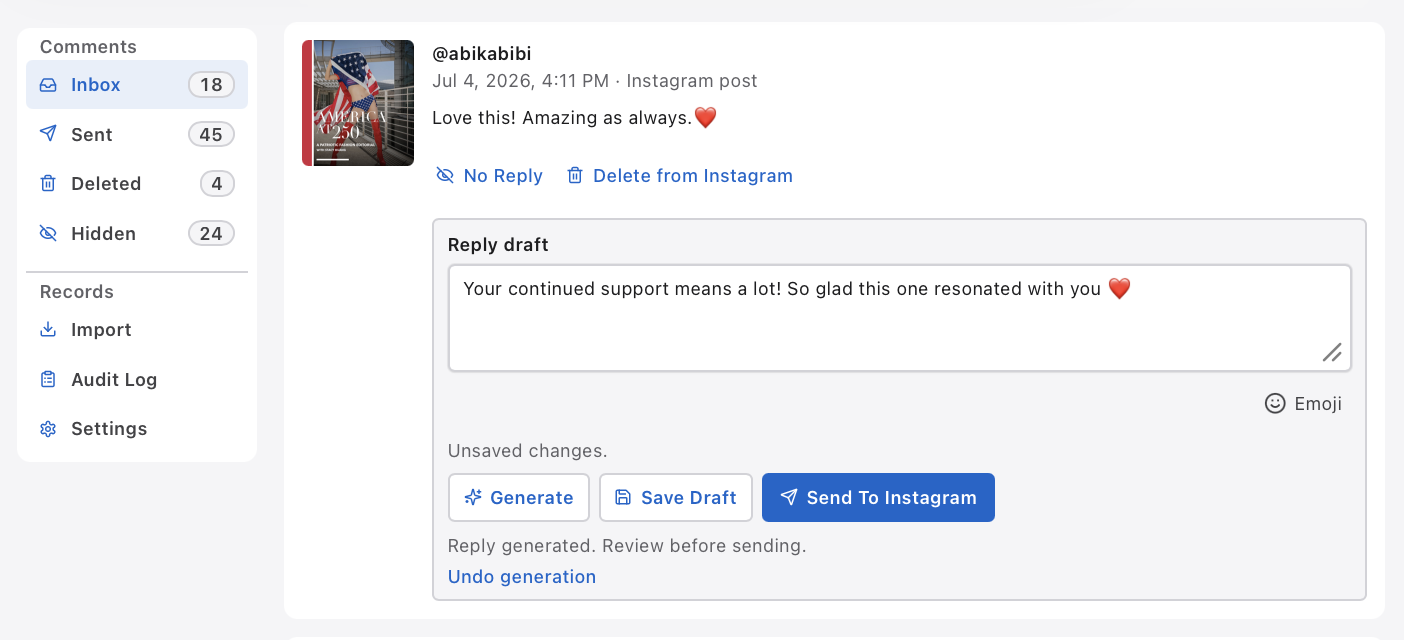
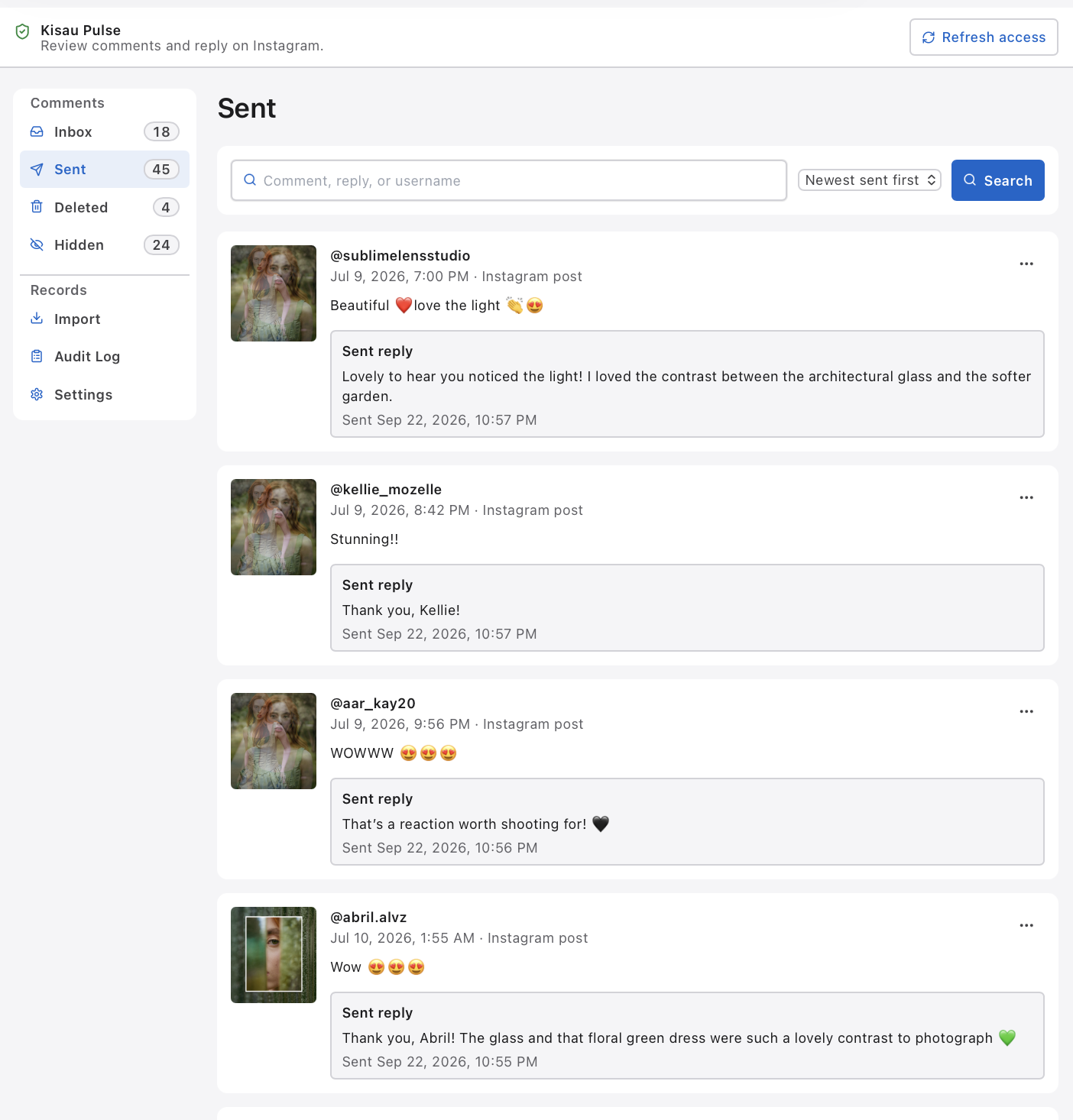
Instagram Comment Engagement: Kisau Pulse
Kisau Pulse is a desktop app I use to organize, filter, and handle incoming Instagram comments. It gives me a unified workspace for comment conversations, much like processing email through an inbox.
I can move between incoming and sent comments, search for a conversation, prepare a reply, and review it before sending. Bringing those steps into one place makes it easier to keep up with engagement while staying thoughtful about each response.
Connected local tools
Local MCP: Search Console and Fstoppers
An MCP, or Model Context Protocol server, gives Codex a structured way to work with another system through defined tools. Instead of switching between separate interfaces for every step, I can bring relevant actions and information into the development conversation.
I developed a Google Search Console MCP to make it easier to interact with my sites' search information, and a Fstoppers MCP to work more easily with Fstoppers. Both are local tools that make recurring tasks more direct while keeping me in control of how I use them.
Learning by building
What These Projects Are Teaching Me
This journey is a process of learning by building. The biggest lesson so far is to walk before running: start small, finish something useful, use it, improve it, and then build from there.
Vibe coding works best when the project has a clear purpose and when the work is shaped through iteration. AI can help generate, refactor, explain, test, and document, but it still needs direction.
In practice, I often find myself taking on the role of an entire Agile team: Product Owner, Designer, Developer, SDET, DevOps, and Technical Writer.
The AI helps me move faster across each role, but it does not remove the need for judgment. It makes judgment even more central.
The work moves faster, but the judgment matters more
Key Takeaways
Vibe coding changes the rhythm of work.
It is not a shortcut for skipping the hard parts of development. It is a way to move ideas from thought to prototype more quickly, then refine them through testing and iteration.
Judgment becomes more important than syntax.
Generative AI can help with code, structure, refactoring, and documentation. That makes product thinking, design decisions, and engineering judgment even more essential.
Start small to go big.
The most effective way I have found to learn AI assisted development is to start with small, practical tools before scaling into full stack applications, integrations, or games.
One person can cover more ground.
Vibe coding allows me to move across roles that usually belong to a larger team, including product planning, design, development, testing, deployment, and documentation.
Questions about vibe coding and AI assisted development
Frequently Asked Questions
Can AI build a complete application on its own?
In my experience, AI can generate code, structure, and early prototypes quickly, but a complete, usable application still needs a human-in-the-loop. Someone has to guide design, test behavior, refine the user experience, review code, and manage deployment. AI works best as a development partner, not a replacement for judgment.
What AI tools are best for vibe coding?
The toolset for AI assisted development continues to change. In my own journey, I have relied heavily on Codex for direct code generation, alongside tools like ChatGPT, Gemini, and NotebookLM for brainstorming, outlining logic, organizing content, and thinking through structure.
Do I need to be an expert programmer to vibe code?
You do not need to write code every day to begin vibe coding, but a foundation in software architecture, logic, and product behavior helps. AI can assist with syntax and implementation, while technical intuition helps you ask better questions, spot problems, and understand how the pieces should fit together.
What kinds of projects can you build using AI assisted development?
The range is wide. In my own work, I have used AI assisted development to build single page web applications, modernize legacy websites, create learning microsites, experiment with browser based games, and plan full stack applications with databases, approval queues, and user workflows.
Do I help other people develop websites?
Yes. I help develop websites as part of the Brand and Identity services offered through Kisau Photography. The work is not limited to photography; it can include the broader web presence around a person, brand, business, or creative project.
How did vibe coding help me return to software development?
After years away from day to day coding, vibe coding gave me a practical way back by letting me think across the whole product: direction, UX, implementation, review, testing, and deployment. Codex helped me use my engineering background again while reconnecting with software development as a full process, not just writing code.
Why start with a small AI assisted project?
Starting with a small, useful project makes the learning loop easier to complete. A focused utility app can be built, tested, used, and improved quickly, which creates confidence before moving into larger websites, learning systems, full stack applications, or games.
What did building a game teach me about AI assisted development?
Building a game pushed the process beyond static content and forms. It required judgment around movement, timing, difficulty, feedback, controls, scoring, and feel, which made the power and limits of AI assisted development much easier to see.